CaLister |
|
CaLister |
|
This application will help you to easily retrieve certain events from your calendar.
The most important use case is when you want to retrieve all events in a time range with a specific name.
E.g. all events for a certain project of the last month to create an invoice. In that case you select the
appropriate calendar from the drop down, type a (sub)string that identifies the event, click the Last Month preset
button and then Search will list the appropriate events. You can now select all events and copy/paste them
into your invoicing application.
|
If you are working per hour then the easiest way is to use ReCal for accounting. This works perfectly when you're working at any Mac. |

|
For the following description we assume the calendar entries in a specific week as shown below:

To quickly find out the description of a certain area just click into the screen shot below.
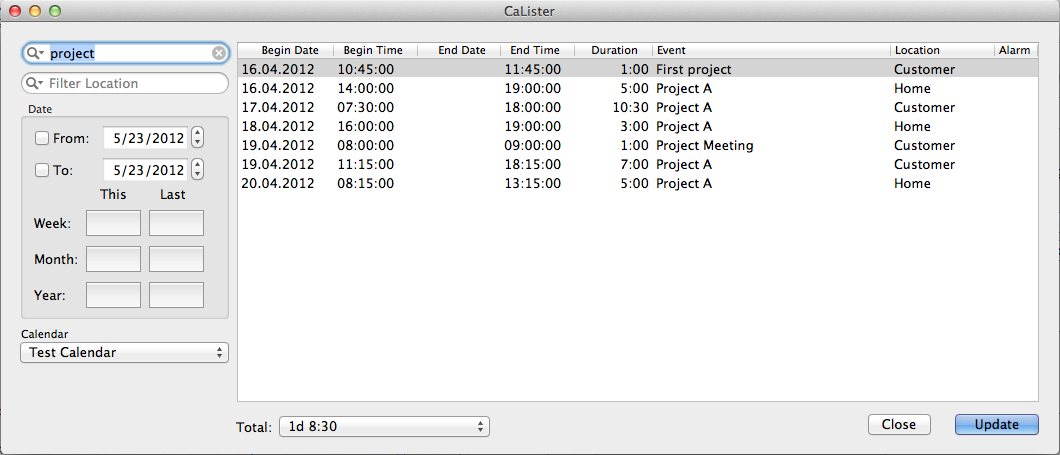
When CaLister is launched it will check all calendars available on your machine. These are placed in a drop down for selection. Note that if you have multiple calendars with the same name (which can happen when using multiple calendar accounts) these are marked with a (number) to make them unique in the list.
Once you have selected a certain calender it is used as default for the next launch of CaLister.
Starting from V2.0 you can configure CaLister so it displays all your calendars for multiple selection. Instead of a simple dropdown it will display something like
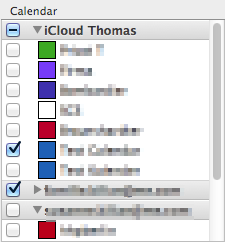
so you can select multiple calendars to be searched.
Description and Location of events can be filtered using any string you specify. The filter matches to any substring of an event. For example if you specify ‘project’ as filter then all ‘Project A’, ‘Project Meeting’ and ‘First project’ events will match.

When you click the magnification glass inside any filter box you will find the Ignore Case option which is checked by default.
If you had unchecked this with the previous search then only ‘First project’ would have matched (since the others have an upper case P in Project).
The case setting is saved permanently.

Both filters create a dissection. That means if you filter by description ‘project’ and location ‘home’ you will get only

The Date box allows to filter a date range. The From and To checkboxes activate the according filter range.
If none is selected all calender entries are respected. If only From is checked then all events starting from that date up to the current day are relevant.
If only To is checked all entries up to that date are relevant. Accordingly the range From/To is relevant if both are checked.
Inside the Date box there are six quick selectors which will preset the From/To values. The buttons in the This column
will only preset the From date with what is specified in the appropriate row (Week/Month/Year). Analogously the Last will set the correct
From and To dates.
The results are simply listed in a fixed tabular format. The Begin Date and Time column show the date/time when the appropriate event start.
End Date is only filled where it is different to Begin Date. End Time is the next minute after the event ends.
Duration is the caluclated event duration and displayed in hh:mm format. Description and Location simply hold the value of the according event property.
Finally Alarms shows a tick where the event has one ore more reminders set.
It is also possible to double click a single row in the result window. This will open iCal in order to highlight the respective event.
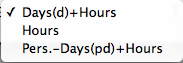
The total time for all filtered events is displayed in the bottom part below the event list. The initial format is that of total 24 hours days plus remaining time (hh:mm).

The display format can be changed via the drop down
 to
to
 and
and
 Here the
 hours format just displays h:mm while working days+hours calculates the number of working days (multiples of eight hours) plus the remainig time (hh:mm).
Copy/paste into other applications like numbers works like all selections. Click and shift- or cmd-click the desired entries or use cmd-A to select all entries. Now you can use cmd-C / cmd-V to copy/paste the entries into any other application. The single columns are separated with a TAB char.
When applied to all entries of above search the paste result in Numbers looks like the following:

Most columns are obviously a simple copy of the results as displayed in CaLister. There are two exceptions. Columns C and D represent the event duration in two different formats. While column C shows hh:mm format the column D holds the hours in decimal format (note that the screen shot was taken from a German localization which is why a comma is used as decimal separator). Column G holds the number of reminders for the appropriate event. This is usually 0 (no reminder) or 1. However, you might have more than one reminder set so this number can also be greater than one.
As an extension to V1 this version has some configuration parameters.

In the left pane you can configure whether you prefer a single dropdown for the calendars or multi selection.
In the right pane you can configure which columns shall be supllied in a copy/paste operation. The order in the paste buffer follows the one displayed.
The checkmarks tell whther the according column is included or not. The From column offers the selection  .
With the first option selected you get a time-date field. The second option selected will return time and date as two columns.
And if the third is selected you will not see any time information for
.
With the first option selected you get a time-date field. The second option selected will return time and date as two columns.
And if the third is selected you will not see any time information for From.
Similarly for the To column the selection looks like this:  .
The
.
The Time only tells to return only the time part without the date for the To column.
Note that this makes only sense if your events start and and in the same day.
Finally for the Duration column you have these options:  which is likely self-explanatory.
In the decimal format the full hours form the integer value and the minutes form the fraction. E.g. a value of 1.5 actually means 1 hour and 30 minutes.
which is likely self-explanatory.
In the decimal format the full hours form the integer value and the minutes form the fraction. E.g. a value of 1.5 actually means 1 hour and 30 minutes.
I have written this litte app for my personal use. That means my (limited) use case is fully covered by what the app currently does. In the likely case that your use case is different from mine just drop me a line and I'll see what can be done. The current version 2 was inspired by feature requests.
